Photography Tips
Take pro-level listing photos with just your phone—no fancy camera needed.
5 Golden Rules
Master these and your photos will stand out
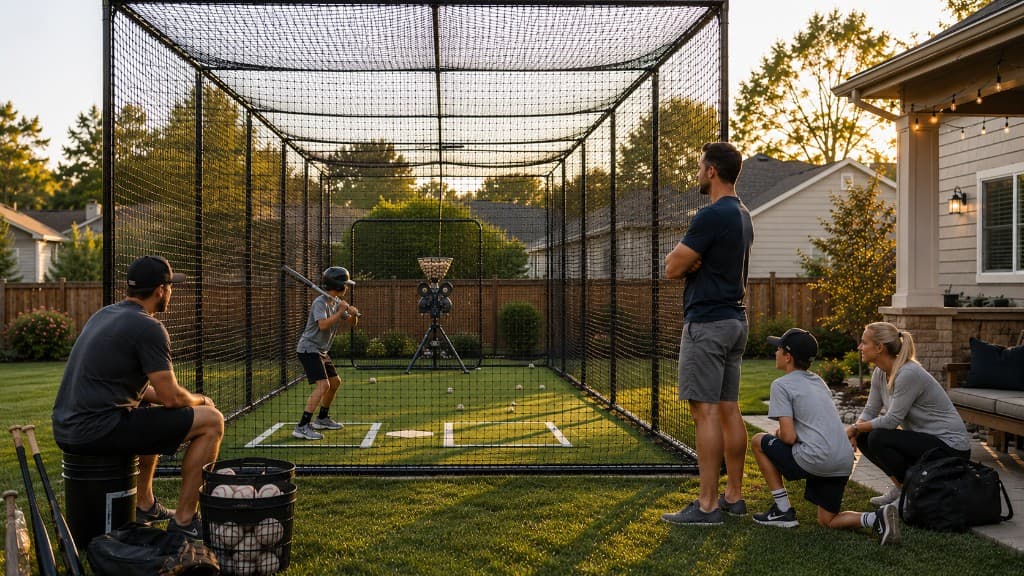
1. Shoot During Golden Hour
6-9am or 5-8pm. Natural light makes everything look pro. Avoid harsh midday sun.
2. Show Real People Using It
Empty cage photos are less compelling. Action shots help guests picture the experience. Ask permission first.
3. Clean First, Then Shoot
Pick up trash, sweep floor, straighten nets. 10 minutes of cleaning = pro-looking photos.
4. Multiple Angles
Front view, side angle, inside looking out, close-ups of equipment. Give guests the full picture.
5. Use Portrait Mode
Blurred background makes your cage pop. iPhone/Android portrait mode is magic.
Photo Rule: Professional-quality photos are the highest-leverage improvement most hosts can make to their listing. Use enough to answer the questions guests would otherwise ask: access, equipment, cage size, amenities, and parking.
Must-Have Shots
Every listing needs these 6 photos
Wide Entrance Shot
First impression. Show how easy it is to access your cage.
Inside Looking Out
Gives guests the "batter's view." Most compelling angle.
Equipment Close-Ups
Show pitching machine, balls, helmets. Guests want to know what's included.
Amenities
Bathroom, parking, seating, WiFi router. Amenities drive bookings—show them!
Action Shot (If Possible)
Player mid-swing = instant credibility. Use burst mode to capture motion.
Before/After Comparison
If you upgraded, show transformation. Guests love seeing improvements.
Phone Camera Settings
Set up for success
Clean Your Lens
Wipe with soft cloth. Smudges ruin photos—most common mistake.
Turn On Grid Lines
Settings > Camera > Grid. Helps with composition and straightness.
Use HDR Mode
Auto HDR in bright light. Balances highlights and shadows.
Tap to Focus
Tap screen where you want sharp focus. Don't rely on auto-focus.
Avoid Zoom
Move closer instead of zooming. Digital zoom = grainy photos.
Shoot in Landscape
Horizontal photos show more. Only use portrait for tall objects.
Editing Basics (2 Minutes Per Photo)
Quick touch-ups make a huge difference
Brightness +10-20%
iPhone Photos app or Google Photos
Most phone photos are too dark. Brighten slightly.
Contrast +5-10%
Any photo app
Makes colors pop without looking fake.
Crop to Remove Distractions
Built-in editor
Cut out trash cans, neighbors' yards, power lines.
Straighten Horizon
Rotate tool in Photos
Crooked photos look unprofessional. Use grid lines.
Saturation +5-10%
Advanced editing
Makes greens greener, blues bluer. Don't overdo it.
Don't Overdo It: If your photo looks fake, you edited too much. Aim for "enhanced reality," not Instagram filters.
Common Mistakes to Avoid
Poor Lighting
Fix: Poor lighting is the most common reason a good cage gets overlooked. Shoot during golden hour or brighten with your phone's flash and edit brightness up.
Blurry/Out of Focus
Fix: Hold phone steady. Tap to focus. Use burst mode for action shots.
Cluttered Background
Fix: Move trash, equipment bags, personal items before shooting.
Only Empty Cage Shots
Fix: Schedule photo shoot when someone is using it. Action sells.
Too Many Similar Angles
Fix: Variety matters. Wide, close-up, inside, outside, amenities.
Uploading All Photos
Fix: Quality > quantity. Pick your best 8-12 photos only.
Pro-Level Tricks
Level up your photos
Use Slow-Motion Video
Capture swing in slo-mo, screenshot the best frame. Instant action shot.
Shoot Through the Net
Artistic angle. Shows netting quality without being boring.
Golden Hour Glow
30 minutes before sunset = magical warm light. Worth waiting for.
Include People Scale
Photo with person shows cage size. Guests can visualize themselves.
Weather Variety
If indoor/covered, shoot on rainy day. Shows "all-weather" advantage.
Night Shots (If Lit)
Show off lighting. Proves cage is usable after dark.
Photo Order Matters
Strategic sequencing for maximum bookings
Photo 1 (Cover)
Best wide shot. This appears in search results—make it count.
Photo 2
Inside looking out (batter's view). Most guests check this second.
Photos 3-5
Action shots, equipment close-ups, unique features.
Photos 6-8
Amenities: parking, bathroom, seating, WiFi.
Photos 9-12
Extra angles, before/after, host photo (optional but builds trust).
Great Photos Build Trust
Spend 30 minutes getting your photos right. It's the best marketing investment you'll make.